You've spent days on a video, you hit publish and… then what? The first two days after an upload are when you learn the most about a video, and when a few small actions make a real difference. This checklist walks you through what to do before you publish, in the first hour, on day one and on day two, and how to read the results.
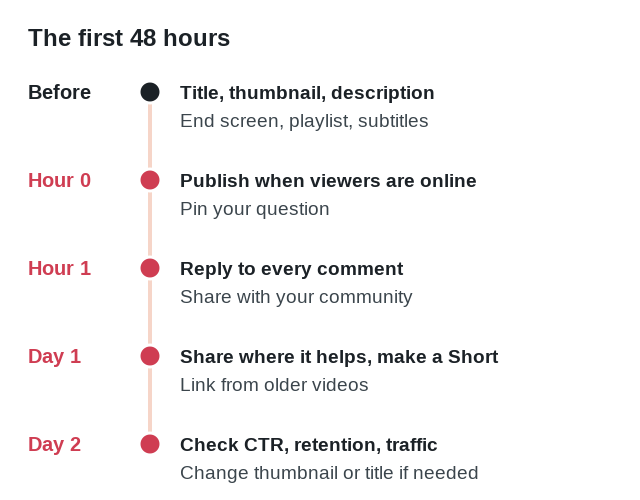
What to do when, from before you publish to day two.
Before you publish
Most problems are cheaper to fix before a video goes live. Run through this list for every upload:
- Title: clear, with the search phrase near the start, under about 60 characters (how to write titles that get clicked)
- Thumbnail: readable at thumb size on a phone (9 thumbnail rules)
- Description: first two lines say what the video is about, with chapters (how to write a description)
- Subtitles: check the automatic captions for mistakes in names and key terms
- End screen: point to your best related video or a playlist
- Cards: link to a related video at the moment you mention it
- Playlist: add the video to at least one playlist
- Pinned comment: prepare a question or bonus tip to pin right away
Viewtrader's free Pre-publish check scores your title, description and tags out of 100, tells you what to fix first and links to the tool that helps. It takes a minute and catches the obvious misses.
Hour 0: publishing
Publish when your viewers are around
Once your channel has some viewers, YouTube Studio shows when they are on YouTube (Analytics → Audience). Publish an hour or two before that peak, so the video is processed and ready. No data yet? Pick a time you can keep every week. Consistency helps more than the perfect minute.
Consider a Premiere
A Premiere turns your upload into a scheduled event with a countdown and live chat. That's great for bringing your audience together at one moment, but only if you have an audience to bring. For very small channels, a normal upload is often better.
Pin your comment
Post your prepared comment and pin it. A specific question works best (see how to get more comments).
Hour 1: be there
- Reply to every comment. Early replies keep conversations going and show new viewers the channel is active.
- Share it with the people who care most. A post on your channel, your newsletter, the Discord or group where your viewers hang out.
- Watch the real-time numbers, but don't panic. The first hour says little about how a video will do in a week, especially for search-driven videos.
Day 1: give it reach
- Share it where it genuinely helps. A forum thread, subreddit or group where your video answers a question someone asked. Answer in a few words and add the link for more.
- Make a Short from the best moment. Link it to the full video, so Shorts viewers can find it.
- Keep replying to comments. Turn good questions into ideas for your next video.
- Mention it in your other videos. Add a card or end screen from an older, related video that still gets views.
Day 2: read the numbers
After 48 hours you have enough data to learn something. Open the video in YouTube Studio and look at:
Impressions and click-through rate
Impressions tell you how often YouTube showed your thumbnail; click-through rate (CTR) tells you how many of those people clicked. Compare with your other videos, not with numbers online. A clearly lower CTR than usual means the title and thumbnail aren't convincing. Change them now; it's never too late.
Average view duration and retention
How long do people stay, and where do they leave? A steep drop in the first 30 seconds means the opening doesn't match the promise. Dips in the middle point to slow parts. (More in what is a good average view duration.) You can't re-edit a published video much, but you can learn for the next one.
Traffic sources
Where do the views come from: search, browse features, suggested videos, external sites? Search means your topic and title match what people look for. Suggested means YouTube links your video to others. That tells you what kind of videos to make more of.
Compared with your usual
YouTube Studio compares a new video with how your recent uploads performed over the same time. It's the quickest way to see whether this video is doing better or worse than usual.
What to change, and what to leave
- Low CTR, good retention: the video is good, the packaging isn't. Try a new thumbnail first, then the title.
- Good CTR, low retention: people click but leave. Check whether the opening delivers what the title promises. For the next video, fix the first 30 seconds.
- Both low: the topic may not be what your audience wants. Compare with your best video and learn from it.
- Slow but steady: leave it alone. Search-driven videos often grow for months.
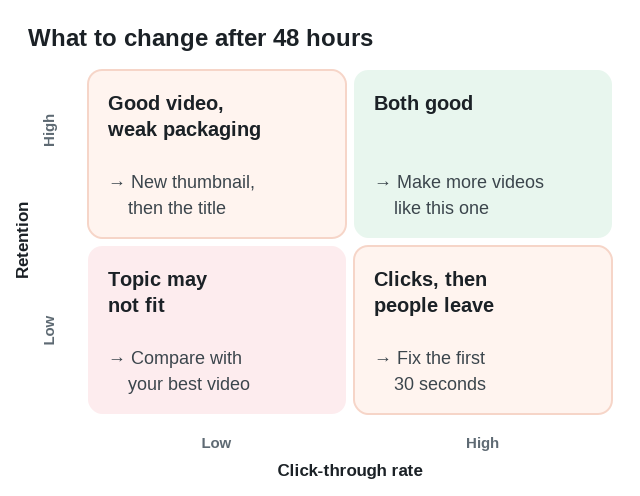
Click-through rate and retention together tell you what to change.
Whatever happens, don't delete a video because it started slowly. Improve it, learn from it and make the next one.
Give your upload a strong start with Viewtrader
For a small channel, the first 48 hours can be quiet: a handful of views, no comments and very little data to learn from. Viewtrader helps creators through that stage together. Start a view campaign when you publish, with views of the length you choose, checked by our extension, and a comment campaign with questions you wrote yourself to open the conversation. Your new video gets watched and talked about by real creators while you work through the checklist above.
Want help before you publish? Viewtrader's AI creator tools cover every step of this checklist: Title studio, Thumbnail check, Description & chapters, the free Pre-publish check and the Reply helper for your comments.
The 48-hour checklist
- Before: title, thumbnail, description with chapters, subtitles, end screen, cards, playlist
- Hour 0: publish at a good time, pin a comment
- Hour 1: reply to every comment, share with your community
- Day 1: share where it helps, make a Short, link from older videos
- Day 2: check CTR, retention and traffic sources, compare with your usual, change the thumbnail or title if needed
New to all of this? Start with how to get your first 100 views on a new video.