Your thumbnail is the poster for your video. Most people decide in a fraction of a second whether to click, and most of them see it on a phone, about the size of a postage stamp, between a dozen other videos. A thumbnail that looks great on your 27-inch monitor can be an unreadable blur in someone's feed. These nine rules help you design for where people actually see it.
The basics: size and format
Upload thumbnails at 1280 × 720 pixels (16:9), as a JPG or PNG. That is the safe standard: sharp on a TV, and small enough to upload from anywhere. Design at that size, but judge it small, which brings us to the first rule.
1. Design for the phone, check at thumb size
Before you upload, zoom out until the thumbnail is about 2 to 3 cm wide on your screen, or send it to your phone and look at it there. Can you tell what it is in one second? Can you read the text? If not, simplify. This one habit fixes most bad thumbnails.
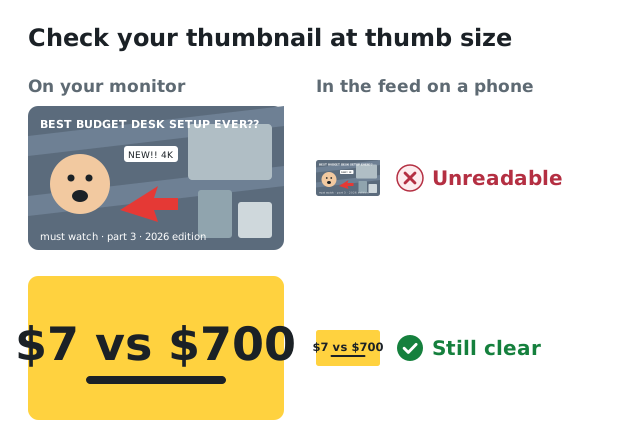
Shrink your thumbnail before you upload: busy designs turn into a blur, simple ones stay clear.
2. One subject, one idea
A thumbnail with a face, a product, an arrow, a logo, three lines of text and a background full of detail says nothing at small size. Pick the one thing that sells the video: the result, the reaction, the object, and make it big. Crop closer than feels natural.
3. Three or four words, or none
Text helps when it adds something the image can't say: "$7 vs $700", "DON'T DO THIS", "DAY 30". Keep it to three or four words, in a thick, simple font, large enough to read at thumb size. Don't put your full title on the thumbnail; people read the title right below it anyway.
4. Let the thumbnail and title tell one story together
The best combinations split the work. The title explains, the thumbnail shows. Title: "I tried the cheapest flight in Europe". Thumbnail: a tiny plane seat and a shocked face. Each adds something the other doesn't. (More on titles in how to write YouTube titles that get clicked.)
5. Use contrast to stand out from YouTube itself
YouTube is mostly white, black, grey and red. Thumbnails in exactly those colours blend in. Bright, saturated colours with a clear difference between subject and background stand out: yellow, cyan, green, orange. A light outline or a soft shadow around a cut-out subject helps it pop against a busy background. Check your thumbnail in both light and dark mode.
6. Faces and emotion, when they fit
People notice faces, especially ones showing a clear emotion: surprise, joy, concentration, disbelief. If you appear in your videos, a close-up of your face with a genuine reaction can work very well. It doesn't have to be exaggerated; it has to be readable. No face in your niche? Then show the result or the object up close.
7. Mind the corners
YouTube puts the video length in the bottom-right corner, and other overlays such as progress bars and "watched" markers can cover parts of the image too. Keep text and important details away from the bottom-right corner and the very edges.
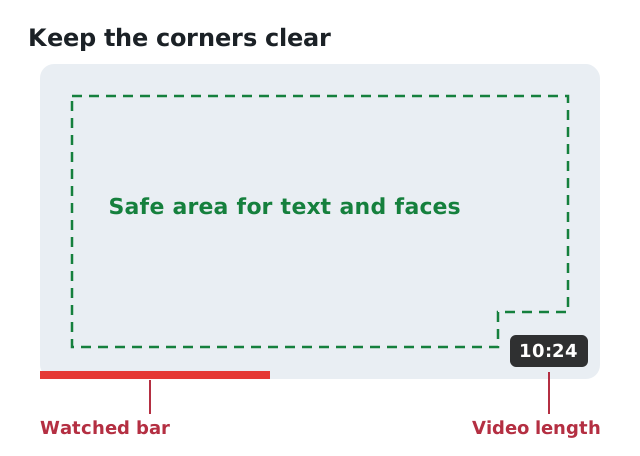
The video length and the watched bar cover the bottom of the thumbnail. Keep text and faces in the safe area.
8. Build a recognisable style
When someone has watched one of your videos, you want them to recognise the next one in their feed without reading your channel name. Use the same font, a consistent colour or layout and a similar framing. Consistency doesn't mean every thumbnail looks the same, but they should look like a family.
9. Promise only what the video delivers
A thumbnail that overpromises gets clicks once. Then viewers leave after a few seconds, and YouTube learns that people who click don't stay. The best thumbnail makes an honest promise and makes it look exciting. Your first 30 seconds should then deliver it.
Common mistakes
- Text that is too small or too thin to read on a phone
- A screenshot from the video used as-is: usually too dark, too busy and too small
- Too many elements competing for attention
- Low contrast between the subject and the background
- The full title repeated in the image
- Important details in the bottom-right corner, under the timestamp
How to know whether a thumbnail works
In YouTube Studio, open the video's analytics and look at the impressions click-through rate after a day or two. Compare it to your other videos rather than to a number online. CTR depends heavily on your niche and on where the impressions come from. If a video's CTR is clearly below your usual, try a new thumbnail. You can change it as often as you like.
If your channel has Test & compare in YouTube Studio, you can upload up to three thumbnails for one video and let YouTube show them to different viewers. That beats guessing.
Get a second pair of eyes before you upload
It is hard to judge your own thumbnail: you already know what it shows. Viewtrader's Thumbnail check looks at the current thumbnail of your video on YouTube, or a new version you upload, together with the title. It gives you a score for how it looks small on a phone, checks readability, contrast, text and focus, and suggests three concrete ideas to make it better. Your image is not stored.
Fix it in your editor, check the new version, then upload it in YouTube Studio. The Thumbnail check is one of Viewtrader's AI creator tools, alongside Title studio for the title that goes with it.
Thumbnail checklist
- 1280 × 720 pixels, JPG or PNG
- Readable at thumb size on a phone
- One subject, cropped close
- Three or four words at most, in a thick font
- Strong contrast, not YouTube's own red, white and grey
- Nothing important in the bottom-right corner
- Adds to the title instead of repeating it
- An honest promise that the video keeps