The description is the most neglected part of most YouTube videos. Many creators paste in a few links and hashtags and move on. That's a missed chance: a good description helps people find your video in search, convinces them it's worth watching and makes long videos easier to navigate with chapters. Here is how to write one, with a template you can copy.
What the description actually does
- It helps search. YouTube and Google read your description to understand what the video is about and when to show it.
- It sells the video. The first lines appear in search results and above the "more" button on the watch page.
- It helps viewers. Chapters, links and resources make the video more useful, and keep people around longer.
The first two lines matter most
Most viewers only ever see the start of your description. On the watch page it is cut off after a line or two, and in search results only a short snippet appears. So those first lines should do the heavy lifting:
- Say in plain words what the video is about and what the viewer gets
- Include the main search phrase naturally, the words people type when they look for this video
- Don't waste them on "Hey guys, in today's video…" or a list of social links
Weak: "New video! Hope you enjoy. Follow me on Instagram!"
Strong: "How to make crispy oven fries without a deep fryer: three tricks that make the difference, plus the mistake that makes them soggy."
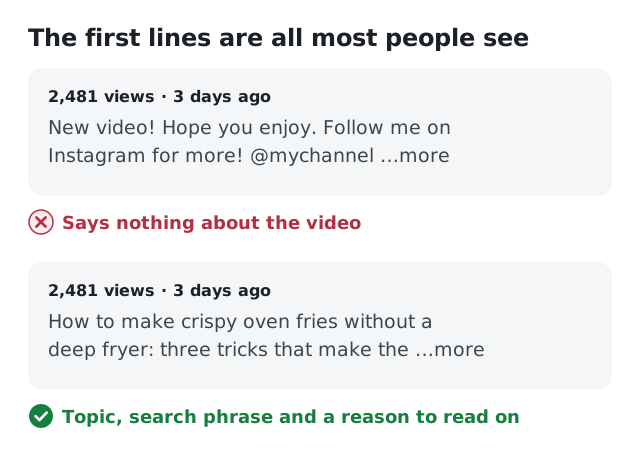
Only the first lines show before "more". Use them to say what the video is about.
A description template you can copy
1. Hook (1–2 lines): what the video is about and why it's worth watching, with the main search phrase.
2. Summary (2–4 sentences): what you cover, who it's for, what they'll be able to do afterwards. Use related terms naturally.
3. Chapters: timestamps with short, descriptive titles.
4. Resources: links mentioned in the video, tools, recipes, sources.
5. Watch next: a related video or playlist.
6. About the channel (1–2 lines): what you make and how often, so new viewers know why to subscribe.
7. Hashtags (up to three): relevant ones only.
Chapters: how they work
Chapters split your video into sections with their own titles in the progress bar. Viewers can jump straight to the part they need, and chapters can show up as "key moments" in Google search, which is extra visibility for free.
To add chapters, put a list of timestamps in your description. YouTube only turns them into chapters when you follow these rules:
- The first timestamp is
0:00 - There are at least three timestamps, in order
- Each chapter is at least 10 seconds long
An example:
0:00 Why my fries were always soggy
0:42 Trick 1: soak the potatoes
2:15 Trick 2: dry them completely
3:30 Trick 3: high heat, no crowding
5:10 The result, side by side
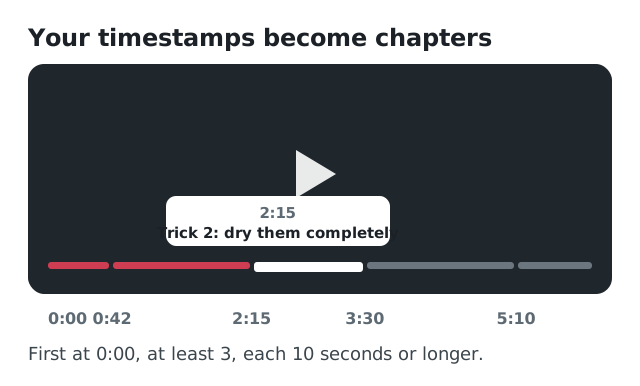
With these timestamps in the description, the progress bar is split into chapters viewers can jump to.
Write chapter titles as mini-titles. "Trick 2: dry them completely" helps viewers and search far more than "Part 2". YouTube can also generate automatic chapters. That's better than nothing, but your own titles are usually clearer.
Keywords without keyword stuffing
Use the words your viewers use, in normal sentences. Mention the main topic in the first lines and related terms further down. Don't add a block of comma-separated keywords at the bottom: it reads like spam, and YouTube's policies treat excessive tags and keywords in descriptions as misleading metadata.
What about tags and hashtags?
Tags play a small role today. They mainly help when your topic is often misspelled or has several names. Add a handful of relevant ones and don't spend much time on them.
Hashtags in the description can appear above your title, and the first three are the ones shown there. Use up to three that describe the topic; more is not better.
Reach viewers in other languages
If part of your audience speaks another language, you can add a translated title and description in YouTube Studio under Languages. Viewers with that language set see the translated version, and it can help your video show up in searches in that language.
Common mistakes
- An empty description, or only links and hashtags
- The first lines spent on greetings or social media
- Chapters that don't start at
0:00, so they don't work - Vague chapter titles like "Part 1, Part 2"
- A wall of keywords at the bottom
- The same copy-pasted description on every video
Write it faster with AI
A good description with chapters takes time, especially the timestamps. Viewtrader's Description & chapters tool reads your title, your current description and, optionally, your subtitles or notes. It writes a full description whose first two lines make people click "more", with chapters and timestamps when you add subtitles with timestamps, plus three hashtags and a tip.
Two other tools work well with it: Tags & keywords suggests the search terms people in your niche actually use, and Translate puts your title and description into up to five languages, ready for YouTube's translations. All three are part of Viewtrader's AI creator tools, and the free Pre-publish check tells you whether your title, description and tags are ready.
A strong description helps the people who already clicked. Getting the click starts with a title worth clicking.