Your title and thumbnail are the only parts of your video most people ever see. They decide whether someone clicks, and whether YouTube keeps showing the video to more people. A great video with a vague title can sink without a trace. This guide covers what makes a title work, ten formats you can reuse and twenty before-and-after examples.
What a good YouTube title does
A good title does three jobs at once:
- It tells people what they get. Within a second, a viewer should know what the video is about and whether it is for them.
- It gives a reason to click now. A result, a surprise, a number, a problem solved.
- It helps search. It contains the words people actually type when they look for a video like yours.
Most weak titles do only one of these. "My new setup!" says nothing. "Desk setup 2026" is searchable but gives no reason to click. "I spent $300 on a desk setup that beats my $2,000 one" does all three.
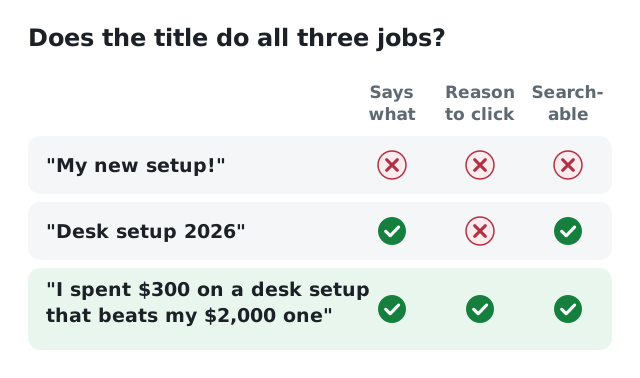
Only the last title tells people what they get, gives a reason to click and contains a search phrase.
8 rules for better titles
1. Clear beats clever
Wordplay and inside jokes work for channels people already know. For a new viewer scrolling past, the obvious title wins. If you have to explain the title, it isn't working.
2. Put the important words first
Phones and search results can cut titles off after about 60 characters, and people scan the start. Lead with the topic or the hook, not with your channel name or an episode number.
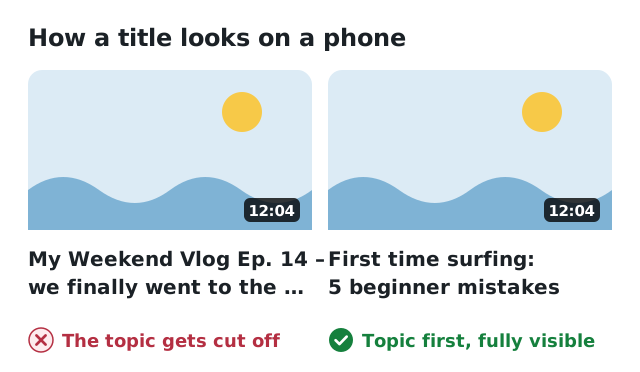
Phones show about two lines of a title. Put the topic first so it is never cut off.
3. Use the words your viewers use
Say "budget", not "cost-efficient". Say "lose belly fat", not "abdominal adipose reduction". Type your topic into YouTube search and look at the suggestions: that is your viewers' vocabulary.
4. Be specific
Numbers, timeframes and concrete results make a title believable. "Learn Spanish fast" is a claim. "What I learned after 90 days of Spanish on Duolingo" is a story.
5. Create curiosity, then deliver
A small open question ("…and it wasn't what I expected") makes people click. Promising something the video doesn't deliver is different. Viewers leave early, and YouTube notices. Curiosity is fine; a lie is not.
6. Let the title and thumbnail work together
Don't repeat the same words in both. If the thumbnail shows the result, the title can explain how. If the title states the topic, the thumbnail can show the emotion or the surprise.
7. Skip the shouting
One word in capitals for emphasis can work. A full title in capitals, five emojis and three exclamation marks look like spam and make your video harder to trust.
8. Write five, pick one
Your first idea is rarely your best. Write at least five versions, read them out loud and pick the one you would click if you were scrolling on your phone.
10 title formats you can reuse
- How to [result] (without [pain]): How to edit videos on your phone (without a laptop)
- [Number] mistakes [audience] make with [topic]: 7 mistakes beginners make with houseplants
- I tried [thing] for [time]: I tried waking up at 5am for 30 days
- [A] vs [B]: which is better for [goal]?: Running vs cycling: which burns more fat?
- The easiest way to [result]: The easiest way to cook rice perfectly every time
- Why [problem] happens (and how to fix it): Why your bread is dense (and how to fix it)
- [Topic] explained in [time]: Index funds explained in 5 minutes
- Beginner's guide to [topic] ([year]): Beginner's guide to Blender (2026)
- What [number/amount] gets you in [place]: What $50 a day gets you in Tokyo
- Don't [common action] until you watch this: Don't buy a used car until you watch this
20 before-and-after examples
- Cooking: "Sunday pasta" → "The 15-minute pasta I make every Sunday"
- Cooking: "Baking bread part 3" → "Why your homemade bread is dense (and the fix)"
- Gaming: "Minecraft lets play ep 12" → "I built a working city in Minecraft survival"
- Gaming: "New update review" → "Is the new update worth coming back for?"
- Tech: "My phone review" → "6 months with the Pixel: what nobody tells you"
- Tech: "Laptop tips" → "10 settings to change on your new Windows laptop"
- Fitness: "Leg day" → "A 20-minute leg workout you can do at home"
- Fitness: "Running update" → "I ran every day for a month: here's what changed"
- Finance: "Budgeting" → "How I save $500 a month on a normal salary"
- Finance: "ETF video" → "ETFs explained for complete beginners"
- Travel: "Lisbon vlog" → "What 3 days in Lisbon really cost us"
- Travel: "Packing" → "How I pack for 2 weeks in one carry-on"
- Music: "Guitar practice" → "The 4 chords that unlock hundreds of songs"
- Music: "Cover song" → "[Song name] acoustic cover in my bedroom studio"
- Education: "Math lesson 5" → "Fractions finally made easy (in 8 minutes)"
- Education: "Study tips" → "How I study 2 hours a day without burning out"
- DIY: "Fixing the sink" → "How to fix a dripping tap in 10 minutes"
- Beauty: "Makeup routine" → "My 5-minute everyday makeup for school"
- Pets: "Training Max" → "How we stopped our puppy from biting in one week"
- Gardening: "Garden update" → "What I'd plant first in a small garden"
Notice the pattern: every "after" says who it's for or what you get, and most contain a phrase someone would search for.
How to tell whether a title works
Give a new video a day or two, then open its analytics in YouTube Studio and look at two numbers together:
- Impressions click-through rate (CTR): how often people who saw the thumbnail clicked. If it is low compared to your other videos, the title and thumbnail aren't convincing.
- Average view duration: if the CTR is high but people leave quickly, the title promised something the video didn't deliver.
You can change a title at any time, also on older videos. A better title on a video that answers a real question can bring it back to life months later. If your channel has Test & compare in YouTube Studio, use it to let YouTube test thumbnails for you.
Let AI give you a head start
Coming up with five strong versions of every title takes practice. Viewtrader's Title studio reads your video's title and description and suggests five new titles. Each comes with why it works and an expected click score, plus a score for your current title and what to improve. You still choose: it is a sparring partner, not an autopilot.
Before you publish, the free Pre-publish check scores your title, description and tags out of 100 and tells you what to fix first. Every Viewtrader plan includes AI actions each month, including the Free plan. See all AI creator tools.
A better title gets more people to click. Making sure the video is seen at all is the next step: read how to get your first 100 views on a new video.