The first 100 views are the hardest you will ever get. You have no audience yet, YouTube knows very little about who your video is for, and every view has to come from a stranger. The good news: most of what gets a new video moving is under your control. Here are nine steps that work for small channels, roughly in the order you need them.
Why a new video gets so few views
YouTube recommends videos to people it thinks will watch them. For an established channel that is easy: show the new video to people who watched the last one. For a new channel there is nobody to show it to yet, so your video depends on two things. It has to show up when people search for something, and it has to perform well when YouTube tests it on a small group of viewers. Everything below helps with one of those two.
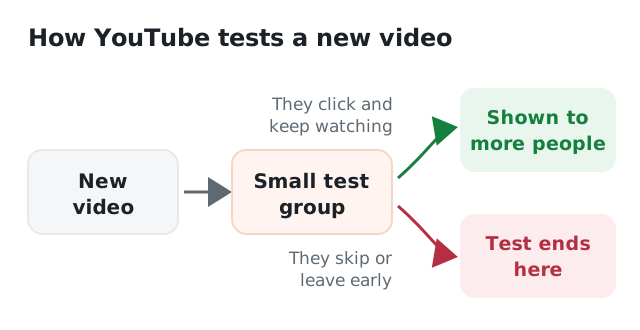
A new video is first shown to a small group. What they do decides what happens next.
1. Make a video someone is already looking for
The fastest way to your first views is to answer a question people type into YouTube. Start typing your topic into the search bar and look at the suggestions that pop up. Those are real searches. "How to" videos, tutorials, reviews and comparisons work well for new channels, because people actively look for them.
Go specific. "Guitar tips" competes with millions of videos. "How to play an F chord without buzzing" competes with far fewer, and the people who find it want exactly that video.
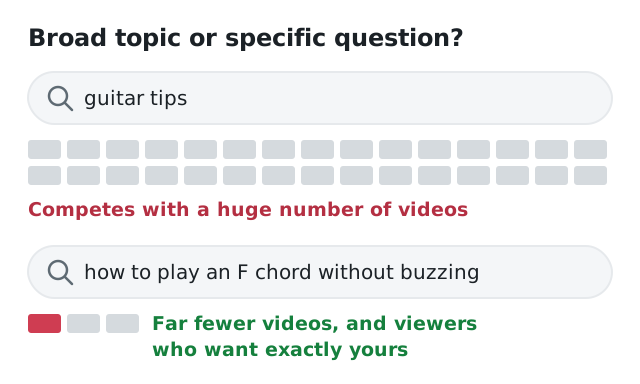
A specific question competes with far fewer videos, and brings viewers who want exactly yours.
2. Put the search phrase in your title
If people search for "beginner sourdough recipe", a title with those words has a far better chance than "My weekend baking adventure". Put the phrase near the start and keep the title under about 60 characters so it isn't cut off on phones. Add a reason to click: a result, a number or a promise you actually deliver.
3. Design the thumbnail for a phone
Most people see your thumbnail as a small rectangle on a phone, next to a dozen others. One clear subject, strong contrast and at most three or four big words. Before you upload, shrink it on your screen until it is about the size of your thumb. If you can't tell what it is, nobody else can either.
4. Deliver the promise in the first 30 seconds
When YouTube tests your video on a small group, it watches what those viewers do. If many leave in the first seconds, the test ends there. Skip the long intro and the "before we start, don't forget to subscribe". Show what the video is about straight away, ideally with a glimpse of the result, and get going.
5. Write a description that helps search
The first one or two lines of your description show up in search results and above the "more" button. Repeat what the video is about in plain words, with the search phrase in it. Add chapters with timestamps if the video is longer than a few minutes: they make it easier to watch, and they can show up as key moments in Google.
6. Share it where it's genuinely useful
Don't drop your link in every group you can find. That gets you ignored or banned. Instead, find the places where your video actually answers a question: a forum thread, a subreddit, a Discord server about your topic, a Facebook group you are already part of. Answer the question in a few words and add the video for people who want more. Also share it with people who appear in the video, or who you mention in it.
7. Keep viewers on your channel
One viewer who watches three of your videos is worth more than three viewers who watch one. Add an end screen that points to your best related video, put your videos in playlists and mention another video when it is relevant ("I explained the basics in this video"). Even with only a handful of uploads, this adds up.
8. Reply to every comment
On a small channel, every comment is a person who cared enough to type something. Reply to all of them, quickly, and ask a question back. It shows new visitors that the channel is alive, and it gives people a reason to come back.
9. Give your new upload a head start
Steps 1 to 8 work, but they take time, and in the meantime it is hard to judge whether a video works if almost nobody sees it. That is where Viewtrader can help. Creators help each other get started: you watch other members' videos to earn credits, and spend them on views of the length you choose, likes, and comments you write yourself. Every view is checked by our extension before the viewer earns anything, so your video gets watched, not just clicked.
It works best as a boost for a video that is already good, not as a replacement for the steps above. The title, thumbnail and first 30 seconds still decide what happens next.
Bonus: be patient with search
Videos that answer a search question often grow slowly. A tutorial can get 10 views in its first week and 1,000 a month half a year later, because people keep searching for the same thing. Don't delete a video that starts slowly. Improve its title or thumbnail, and keep making the next one.
Checklist for your next upload
- A topic people search for, as specific as possible
- The search phrase near the start of the title, under 60 characters
- A thumbnail that reads at thumb size
- The promise delivered in the first 30 seconds
- A description that starts with what the video is about, plus chapters
- Shared in one or two places where it truly helps
- End screen and playlist pointing to your next video
- A reply to every comment
Working toward monetization? Read what you need for the YouTube Partner Program and why watch time matters more than the number of videos.
Want a second opinion before you publish? Viewtrader's AI creator tools can suggest titles, check your thumbnail on a phone and score your video with a free pre-publish checklist.