A video with an active comment section feels alive. New visitors see that other people watched and cared, regulars come back to join the conversation, and you get direct feedback on what works. Yet most small channels get almost no comments, even on good videos. Usually the reason is simple: nobody gave viewers a reason or an easy way to say something. Here is how to change that.
Why comments matter for a small channel
- Social proof: an empty comment section makes a video look unwatched. A few real conversations make new viewers more likely to stay and join in.
- Community: people who comment and get a reply are far more likely to come back for your next video.
- Ideas: comments tell you what people didn't understand, what they want next and what they loved. That is free research for your next video.
1. Ask a specific question
"Let me know what you think in the comments" almost never works. It is vague and takes effort to answer. A specific, easy question does work:
- "Which of these three would you try first?"
- "What's the worst advice you got when you started?"
- "Should part 2 be the budget version or the pro version?"
The best questions can be answered in a few words, have no wrong answer and let people share their own experience.
2. Ask at the right moment
Asking at the very end reaches only the people who stayed until the end. Ask when the topic comes up naturally, for example right after you've shown two options or shared a strong opinion. That's when viewers have something to say.
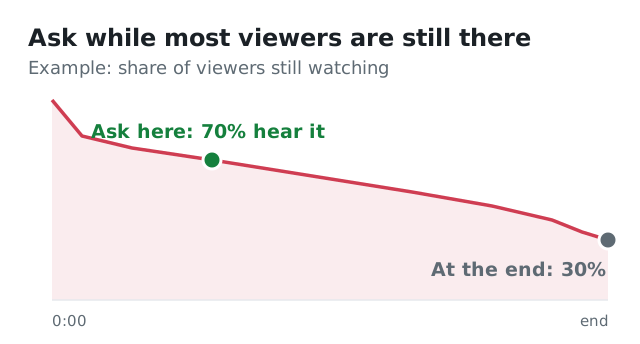
Ask halfway and far more viewers hear the question than at the end. (Example numbers.)
3. Pin a comment that starts the conversation
Post a comment of your own right after publishing and pin it. Use it for your question, a bonus tip that didn't make the video, or a correction. A pinned comment is the first thing people see in the comment section, so it sets the tone.
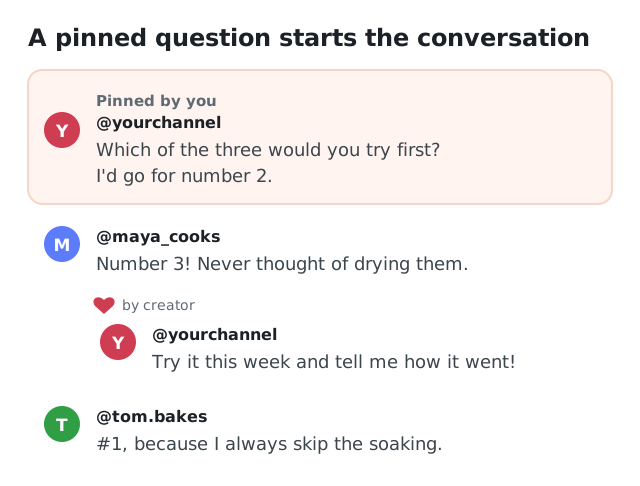
Pin your own question right after publishing, and reply to the first comments quickly.
4. Reply quickly, especially in the first hours
Comments that get a reply attract more comments. Try to answer everything in the first hours after publishing, when most of your early viewers are watching. Don't just write "thanks!": reply with something personal or a follow-up question, so the conversation keeps going.
5. Heart and highlight good comments
Giving a comment a heart takes one click and tells the viewer you read it. For great questions, consider answering them in a future video, and mention the commenter by name. Nothing motivates people to comment more than seeing that it leads to something.
6. Make your video a little "unfinished"
Videos that cover absolutely everything leave little to add. Leave room: share your opinion and invite disagreement, rank things and ask how others would rank them, or mention one thing you're unsure about. People love to help and to correct.
7. Keep the comment section a nice place
Nobody wants to comment between spam and insults. In YouTube Studio you can hold potentially inappropriate comments for review, block words and hide users. A clean comment section makes thoughtful viewers more willing to post.
8. Turn comments into content
Reply to a good question with a Short, make a "your questions answered" video or start your next video with a comment that inspired it. It shows viewers that commenting is worth it, and it gives you easy video ideas.
What not to do
- Don't beg ("please comment, it helps the algorithm"). It sounds desperate and rarely works.
- Don't run "comment to win" giveaways all the time. You get one-word comments from people who never come back.
- Don't leave comments unanswered for days on a small channel. Early replies matter most.
How Viewtrader can help
The hardest part is the first comment. People hesitate to be the first to speak in an empty room. With a comment campaign on Viewtrader, you write the comments you'd like to see under your video, such as questions, reactions or timestamps, and members of the community post them from their own YouTube channel. Our extension checks that each comment is really there before the member earns credits. It's a way to start the conversation on a new video, so the first real viewers don't arrive to an empty comment section.
Not sure what to write? Comment ideas suggests comments based on your video, which you can edit before you start. And when the comments come in, the Reply helper shows the comments you haven't answered yet and drafts a short, personal reply to each, in the tone you choose. You check every reply and post it yourself; we never post anything for you. Both are part of Viewtrader's AI creator tools.
Comment checklist for your next video
- One specific, easy question, asked where it fits naturally
- A pinned comment of your own right after publishing
- Replies to every comment in the first hours, with a follow-up question
- Hearts for good comments, and questions answered in a future video
- Spam filters on in YouTube Studio
Comments are one part of a strong start. Read how to get your first 100 views on a new video for the rest.